
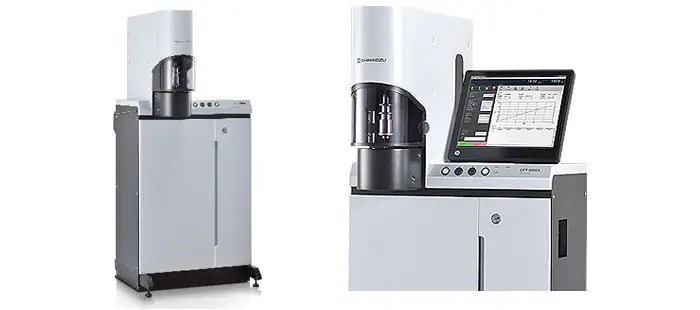
Shimadzu CFT EX Series
Shimadzu CFT EX Series — Testing machines.
The CFT-EX series comprises the CFT-500EX and CFT-100EX constant-pressure extrusion capillary rheometers, sharing identical construction and software. Both measure flow rate of fluid materials under controlled temperature and pressure to calculate viscosity, supporting constant-temperature and constant-heating-rate modes for softening and flow-beginning temperatures. They serve as bench-top instruments in material characterization laboratories.
Full specifications
| Max test force | Constant temperature tests, constant velocity rising temperature tests |
Description
Construction and Series Positioning
The CFT-EX is a constant-pressure extrusion capillary rheometer available in two model numbers, CFT-500EX (344-04260-58) and CFT-100EX (344-04261-58), which share the same appearance and operating software. The main unit weighs approximately 160 kg and requires a solid, level floor (horizontal tolerance 1/500). The operation unit provides four buttons (START, STOP, AIR, HEAT) and two LED indicators (ALARM, POWER). The press joint can bend at 90°, and the knurlizer adjusts the load head up/down to set piston contact level according to sample volume.
Behavior Under Load and Test Modes
- Constant-temperature mode: measures flow rate under controlled temperature and pressure, calculating viscosity.
- Constant-heating-rate mode: determines softening temperature and flow-beginning temperature.
- Viscosity correction and shear sensitivity N are supported per Chapter 12 technical data.
- Flow curve smoothness depends on correct air pressure (0.4 ± 0.02 MPa); troubleshooting includes cleaning the die orifice and removing the die stopper.
Installation, Connection, and Control
- Environmental limits: +10 °C to +35 °C, ≤60 % RH non-condensing, vibration ≤0.005 G, supply voltage fluctuation ±10 %.
- Power: single-phase AC 100 V, 700 VA, 50/60 Hz; D-class grounding with ≤100 Ω resistance.
- PC connection via USB on the rear panel; CFT-EX software installed from Setup CD-ROM (setup.exe) with administrator rights; default folder C:\CFT.
- USB driver selection depends on OS: Windows 10 uses DPInst64.exe; Windows 7 32-bit uses DPInst.exe; Windows 7 64-bit uses DPInst64.exe.
- Set PC Power Options [Sleep] and [Turn off hard disks] to [Never] to prevent communication loss.
- Touch panel operation requires display driver installation; On-Screen keyboard supports numeric keypad and system keys, unlike touch keyboard.
Integration & Operating Notes
Verify the manometer reads 0.4 ± 0.02 MPa before operation; adjust per Section 10.3 if necessary. Incorrect pressure affects cylinder speed and flow curve smoothness, and zero or improper air pressure is a listed troubleshooting cause.
The [HEAT] button should only be set to ON when the software is displaying the current temperature. This prevents heater activation without temperature monitoring, reducing risk of overheating.
Start the system via [On-Line] in the program manager. If the tester is OFF or communication fails, an error message is displayed and the on-line main window is not opened. Ensure USB cable is connected to the rear panel and driver installed.
Before turning OFF the power switch, close the stop valve clockwise. This prevents air pressure loss and protects the pneumatic system during shutdown.
If ALARM1, ALARM2 and POWER lights blink simultaneously, the CPU board has a problem. Restart the system once; if blinking continues, contact Shimadzu.
Operating temperature range is +10 °C to +35 °C with minimal daily variation; humidity ≤60 % non-condensing; vibration acceleration ≤0.005 G. Excursions may affect measurement stability; condensation can damage electronics.
EMC compliance: EN61326:1997 + A1:1998 + A2:2001 + A3:2003, class A emissions, minimum immunity requirements. Maintain distance from sensitive devices and use a separate power source from strong EMI noise sources.
Selection & Integration Q&A
Both models share the same appearance and operating software; the manual covers both under CFT-EX series. Selection depends on specific force capacity or application requirements not detailed in the provided facts. Consult Shimadzu for model-specific specifications.
Use a PC with Windows 10 (64-bit) or Windows 7 (32/64-bit). Install CFT-EX software from Setup CD-ROM with administrator rights; install correct USB driver (DPInst64.exe for Win10/64-bit, DPInst.exe for Win7 32-bit). Connect USB cable to rear panel. Set Power Options Sleep and hard disk turn-off to Never.
Consumables and maintenance parts are listed in Chapter 11; replacement cycles are rough estimates and may require earlier replacement depending on usage. The PC, USB cable, and optional units are not included. Replacement parts are available for seven years after discontinuation.